 to pick a date from a pop-up calendar.
|
For background information, see: About Calender Controls |
The calendar control lets you enter the date or time. You can type in
the date or click the calendar button to pick a date from a pop-up calendar.
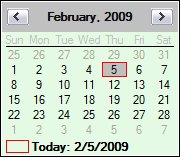
Click
the year, and then click the up and down arrows that appear ( ) to select a year.
Click
the left and right arrows to select a month (advance or go back one month).
Or
Click the month, and then select a month from the list that appears.
Click a number on the calendar to select a day.
Click today's date at
the bottom of the calendar ( Today) to move to today's
date (the calendar closes and today's date appears in the text box portion
of the calendar control).
Today) to move to today's
date (the calendar closes and today's date appears in the text box portion
of the calendar control).
Note: If you are using a calendar control that includes the time option, you enter the time in the text box field after you enter the date.
Related Topics: |