|
For background information, see: About the Scheduler |
To reschedule an appointment:
Select the patient on the Scheduled worklist.
Click Edit Schedule.
To move an appointment, position your cursor on the colored bar and drag the appointment to a new time. If there is more than one study scheduled, all the studies will move together. To move only one study from the group or to change the order the studies are performed, right-click the appointment and select Move Together (consecutive appointments).
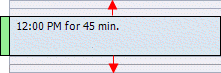
To increase or decrease the amount of time for an appointment, hold down the Ctrl key on the keyboard and drag the top or bottom edge of the time block.
To move an appointment to a different date, double-click the appointment and select a new date and time from the dialog box.
Related Topics: |