Using PHILIPS SpeechMike
|
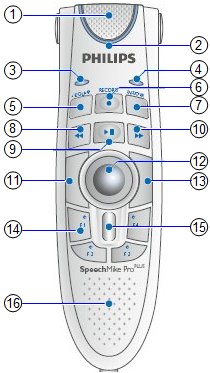 |
Microphone Record LED Instruction LED Insert/Overwrite LED EOL (end-of-letter)/priority Record Insert/Overwrite Fast rewind Play / Pause Fast forward Left mouse button Trackball Right mouse button F1–F4 programmable function keys Scroll wheel Speaker |
The following list shows the commands that can be assigned to the F1
– F4 buttons on the SpeechMike from User
Preferences.
Addendum – Selects the Addendum button
Assign to Conference – Assigns the exam to a conference
Cancel
Dictated – Selects the Dictated button
Dictated and advance – Selects the Dictated button and moves to the
next patient
Edit Patient
Edit Schedule
Justification On Hold and advance – Selects the Justification On Hold
check box and moves to the next patient
Justification On Hold button – Selects the Justification On Hold check
box
Justification Reject
Justification Reject and advance
Link Patient History
Mark Study
Move to next jump field – Moves to the next jump field in the diagnostic
report
Move to previous jump field – Moves to the previous jump field in the
diagnostic
Next data window tab – Selects the next data window tab
Next Patient – Moves to the next patient
Next prior in patient history – Scrolls to the next prior in the patient
history list
OK
Patient Search
Previous Data Window Tab – Selects the previous data window tab
Previous Patient – Moves to the previous patient
Previous Prior in Patient History – Scrolls to the previous prior in
the patient history list
Print Diagnostic Report
Sign 1 – Selects the Sign 1 button
Sign 1 and advance – Selects the Sign 1 button and moves to the next
patient
Sign 2 – Selects the Sign 2 button
Sign 2 and advance – Selects the Sign 2 button and moves to the next
patient
Sign 3 – Selects the Sign 3 button
Sign 3 and advance – Selects the Sign 3 button and moves to the next
patient
Toggle Note to Radiologist – Selects the Toggle Note To Radiologist
check box
Toggle On Hold – Selects the Toggle On Hold check box
Toggle Print Rules – Selects the toggle print rules check box
Transcribe – Selects the Transcribe button
Transcribe and advance – Selects the Transcribe button and moves to
the next patient
Unlink Patient History
Unmark Study
View Results