|
For background information, see: About Data Windows |
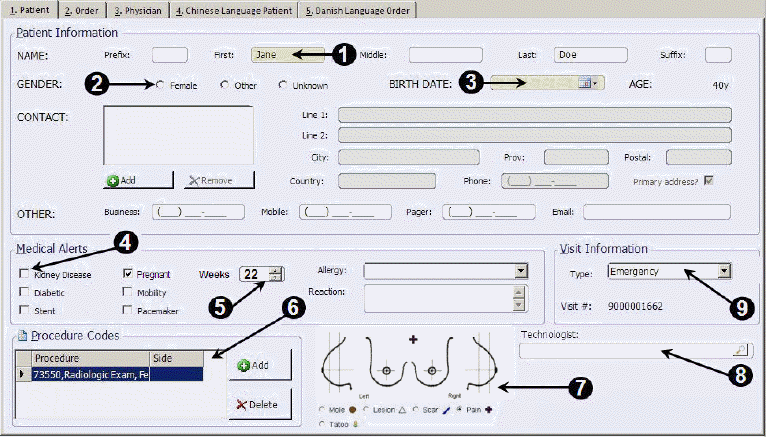
RIS data windows consist of elements called controls. Controls are used to enter information in RIS. Control types and availability vary at each site.
|
Control Type |
Description |
|
1. Text Box |
Enter information including a patient's name, e-mail address, or telephone number. |
|
2. Option Button |
Select one item from a group of options. |
|
3. Calendar Control |
A text box that lets you select a date. Click the drop-down arrow on the calendar button to select a date or you can type the date or time. |
|
4. Check Box |
Select or clear check boxes to turn options on or off. You can select more than one check box at a time. |
|
5. Spin Button |
A text box with up and down arrows that you click to move through a set of fixed values. You can also type a value in the text box portion of the control. |
|
6. Data Grid |
To enter information in a data grid, click a cell and type the information. Use the tab key to move through the cells. Press Enter to advance to the next row. |
|
Draw on the image, using the predefined shapes, to indicate a problem area. | |
|
8. Search Box |
A search box includes a search button ( |
|
9. List Box |
A list box includes a drop-down arrow that you click to open a list of options. After the list appears, select an item in the list. The contents of list boxes can be modified by right-clicking the box. |
Related Topics: |
 ) that you click to open a search window. For example,
the search box can be used to search for a patient's name or a radiologist.
) that you click to open a search window. For example,
the search box can be used to search for a patient's name or a radiologist.